
Vehicle page
The vehicle page is where all information about a specific vehicle is collected.
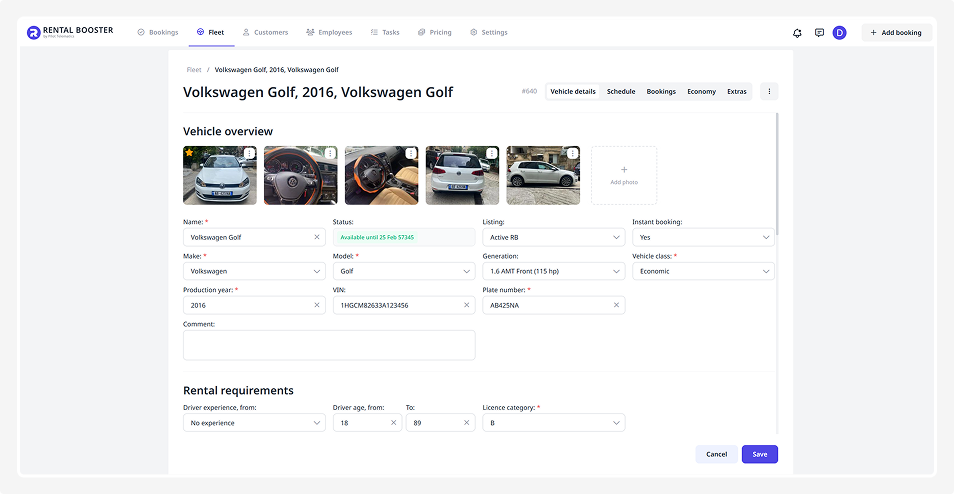
On this page, you can:
— view and edit vehicle details
— manage bookings, schedule, and finance-related data
— set up rental rules and usage conditions
— connect extras
— upload documents
To open the vehicle page, click Edit in the vehicle card.
The vehicle page includes five tabs:
• Vehicle details: vehicle name, brand, model, year, status, and configuration
• Schedule: when the vehicle is available or booked
• Bookings: list of all bookings for this vehicle
• Economy: prices, rates, and limitations
• Extras: add-on services available for this vehicle, such as a child seat or insurance
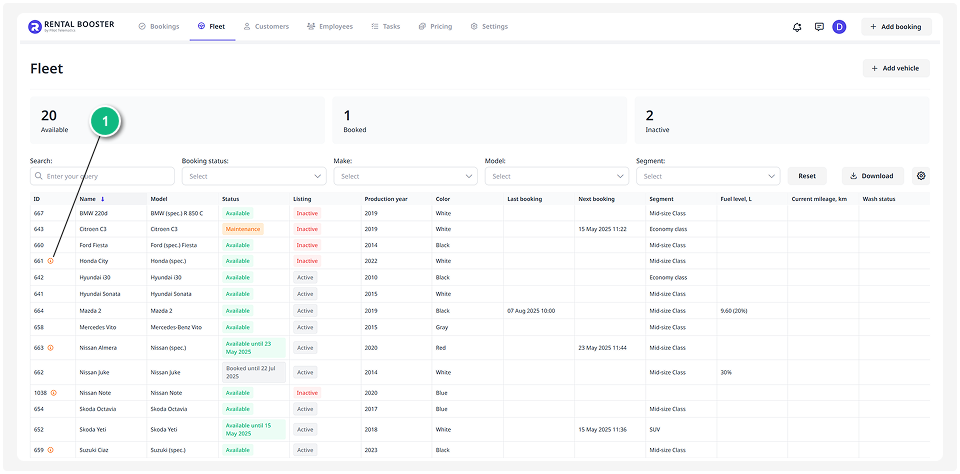
For the vehicle to appear in bookings, all required fields on its page must be filled in. If any required data is missing, the vehicle will not be available to customers.
A warning icon will appear next to this vehicle in the fleet list.

Next, we’ll look at each function and tab on the vehicle page in detail.