
How to prepare the vehicle
After you confirm a task, it becomes Active with the status Accepted — this means you have taken it into work.


Before the vehicle pick-up, you can prepare the vehicle: wash it, refuel it, and record the expenses in the app.
On the accepted task screen, you will see:
-
Task type
-
Date and time
-
Vehicle — tap to view vehicle details
-
Address — open the location on the map or change the pick-up location

-
Washing and refueling — preparation block
-
Extra services — services included in the booking
-
Customer — name and contact details
-
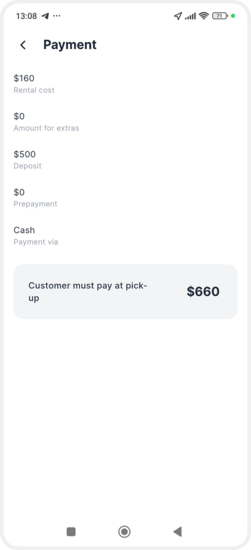
Payment — amount the customer needs to pay at pick-up

How to record a vehicle wash
1. Go to the Washing and refueling section

2. Tap Mark washing

3. Enter the cost
4. Tap Add
The cost and date will be saved in the vehicle preparation form.

How to record refueling
1. Go to the Washing and refueling section
2. Tap Mark refueling
3. Enter the cost

4. Tap Add
The refueling details will also be saved in the task.
Once you start preparation, the task status changes to Preparation.

When the vehicle is ready and you meet the customer, tap Start pick-up to proceed with the vehicle handover process.