
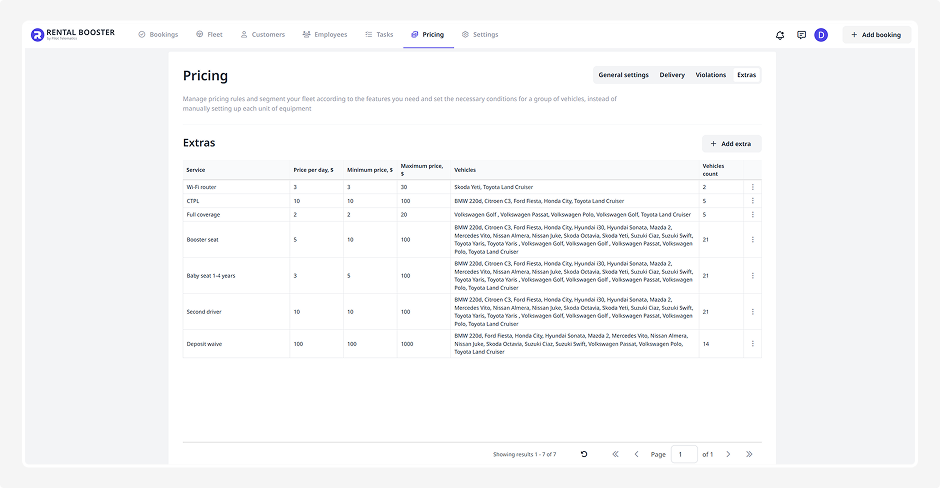
Extras
Here you can set up the additional services that customers can choose when making a booking, for example:
• Child seat
• Wi-Fi router
• Additional driver
• Insurance

How to add an extra
1. Click Add extra
2. In the pop-up window, fill in the following fields:
• Service name — select from the list:
— Baby seat 0–1 years
— Baby seat 1–4 years
— Booster seat
— Wi-Fi router
— Free cancellation
— Second driver
— TPL (Third-party Liability Insurance)
— CTPL (Compulsory Third-party Liability Insurance)
— Full coverage
— Deposit waive
• Price type — specify how the cost of the extra is calculated — either once for the entire rental period or per rental day:
— Static — price does not depend on the rental length. For example, Wi-Fi router – $15 for the full rental. Specify only the total price for the service.
— Dynamic — price is calculated per rental day. Here you enter the price per day, minimum, and maximum price.
• Maximum quantity — specify how many times the extra can be selected. For example, for the Additional driver extra, you can set 2 if you allow up to two additional drivers. Or set 3 booster seats if the car allows three child seats.
3. Check the boxes next to the vehicles this extra can be applied to
4. Click Save. The new extra will appear in the list
If you need to edit or remove an extra, click the three dots next to it and choose Edit or Delete.