Vehicle pick-up
After you complete the vehicle pick-up with the customer, all related information appears in the Vehicle pick-up tab on the booking page.
Here you can review the pick-up details and add any missing information if necessary.
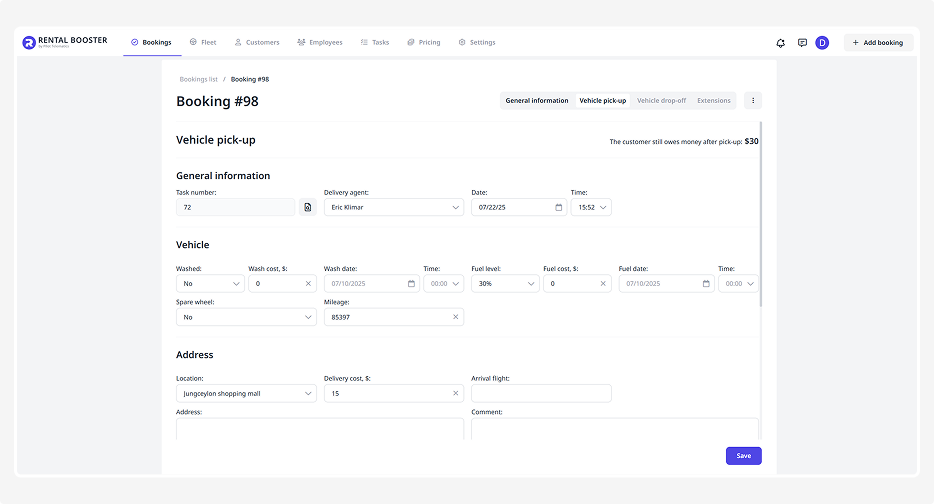
The Vehicle pick-up tab consists of several blocks:
• General information
• Vehicle
• Address
• Documents
• Payment
General information
This section shows:
• Task number — an automatically assigned number for the pick-up task
• Delivery agent — the staff member who handed over the vehicle to the customer
• Date and time of pick-up — when the customer received the vehicle
Vehicle
This block contains details about the vehicle:
• Whether the car was washed before pick-up and its cost
• Date and time of the car wash
• Fuel level, refueling date, and refueling cost
• Availability of a spare wheel
• Mileage at the time of pick-up
Address
This section displays the pick-up address:
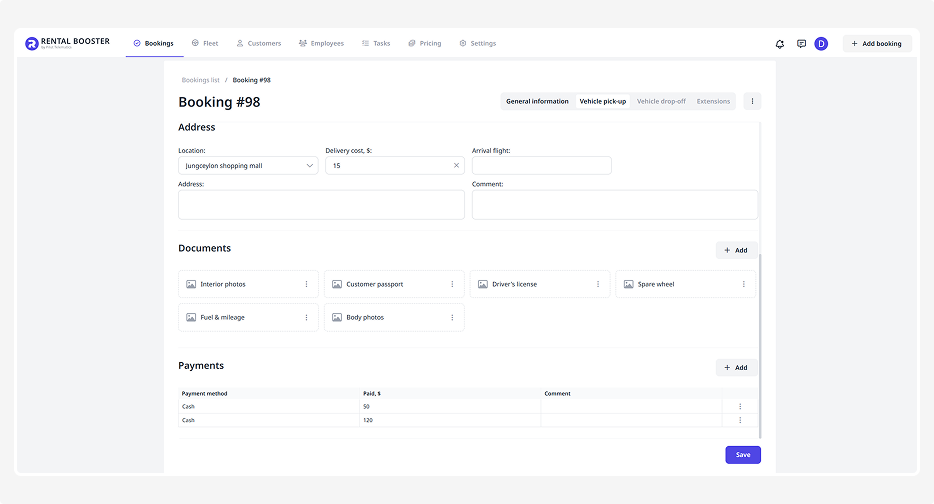
• Location and delivery cost
• Customer’s flight number (if applicable)
• Exact address of the vehicle handover
Documents
This block stores files or photos related to the vehicle handover.
How to add a document:
1. Click Add
2. Enter the document name
3. Select the file from your device
4. Click Save
Payment
Here you can review the payments made by the customer.
To add a payment:
1. Click Add
2. Choose the payment method — card, cash, or bank transfer.
3. Enter the payment amount
4. Add a comment if needed
5. Click Save
After updating any information in the Vehicle pick-up tab, click Save.