How to complete a vehicle pick-up
Once the booking is confirmed, the next step is the vehicle pick-up — the process of handing over the vehicle to the customer.
The pick-up is completed using a special form.
A fleet employee fills it out by specifying delivery details, the vehicle’s technical condition, related documents, and payments.
After completing this process, the vehicle is considered officially handed over.
How to start the vehicle pick-up
1. Open the required booking
2. On the booking page, click the three dots in the top-right corner
3. Select Vehicle pick-up
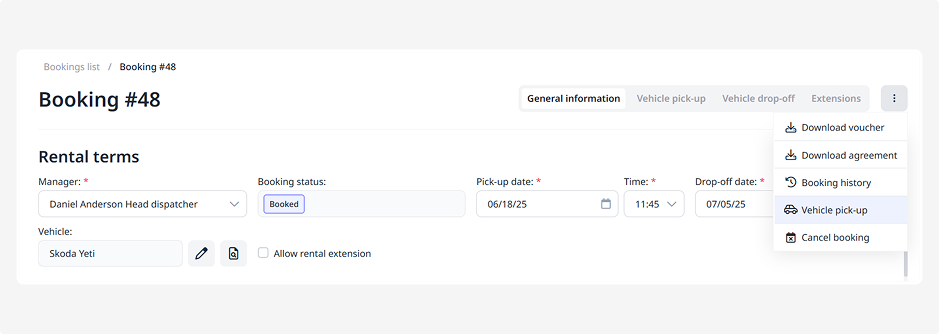
4. Fill out the pick-up form, which includes several blocks:
• General information
• Vehicle
• Documents
• Payment
• Calculation
The data in the General information, Payment, and Calculation blocks is automatically filled in from the booking details — review it and edit if necessary.
General information
Here, you record who is delivering the vehicle and where it will be handed over.
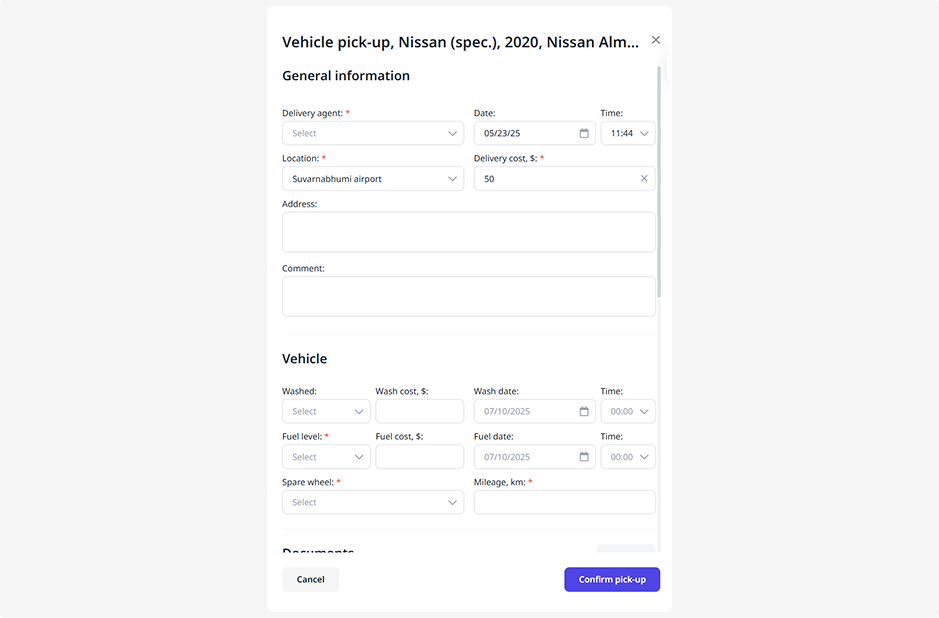
• Delivery agent — select the staff member responsible for the pick-up
• Date and time — specify when the handover takes place
• Location — choose the location from the available list
• Address — specify the exact address
• Delivery cost — if applicable, enter the delivery fee
• Comment — add any relevant notes or details
Vehicle
Here, you record the vehicle’s condition at the time of the pick-up:
• Car wash — mark whether the vehicle has been cleaned
• Car wash cost and date
• Fuel level, refueling date, and fuel cost
• Spare wheel — indicate if it’s present
• Mileage — record the odometer reading
Documents
Attach photos and other files related to the vehicle pick-up.
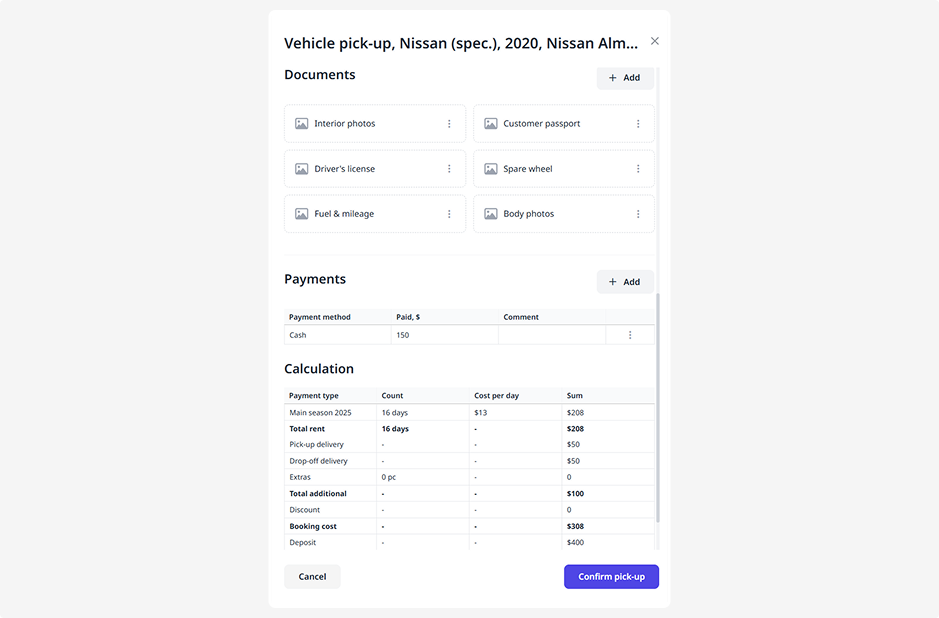
To add a document:
1. Click Add
2. Enter the document name
3. Select the file
4. Click Save
Payment
Specify how much the customer paid and which payment method was used.
To add a payment:
1. Click Add
2. Choose the payment method — card, cash, or bank transfer
3. Enter the payment amount
4. Add a comment if necessary
5. Click Save
If the customer paid in parts, you can add multiple payments using different methods.
Calculation
This block displays the payment details:
• Payment types (for example: rental, extras, delivery)
• Number of days or units
• Price per day or unit
• Total for each type
At the bottom of the table, you’ll see the total amount including prepayments, discounts, and surcharges.
Check Card payment if this method was used.
How to complete the vehicle pick-up
Once all information is filled in:
-
At the bottom of the form, click Confirm pick-up
2. After that, the booking status will change to Active, and the vehicle will be considered officially handed over to the customer